Integrating 4 Marketing Platforms Behind a Single API: The Provider Adapter Pattern
Facebook Ads, RealEstate.com.nz, Trade Me, One Roof — each with wildly different APIs and workflows. How we unified them behind a single campaign interface using the Adapter pattern.
Real estate agents in Australia and New Zealand advertise on multiple platforms simultaneously. A single property listing might run as a Facebook ad campaign, a RealEstate.com.nz listing, a Trade Me auction-style listing, and a One Roof showcase — all at the same time, all managed from the same dashboard.
Each platform has its own API, authentication method, data format, and publishing workflow. Facebook wants ad creative with targeting and budgets. RealEstate.com.nz expects XML-format property listings. Trade Me has its own category system. If we’d built each integration as a one-off, the campaign management code would be a tangled mess of platform-specific logic.
Instead, we used the Adapter pattern to unify them behind a single campaign interface.
The Problem
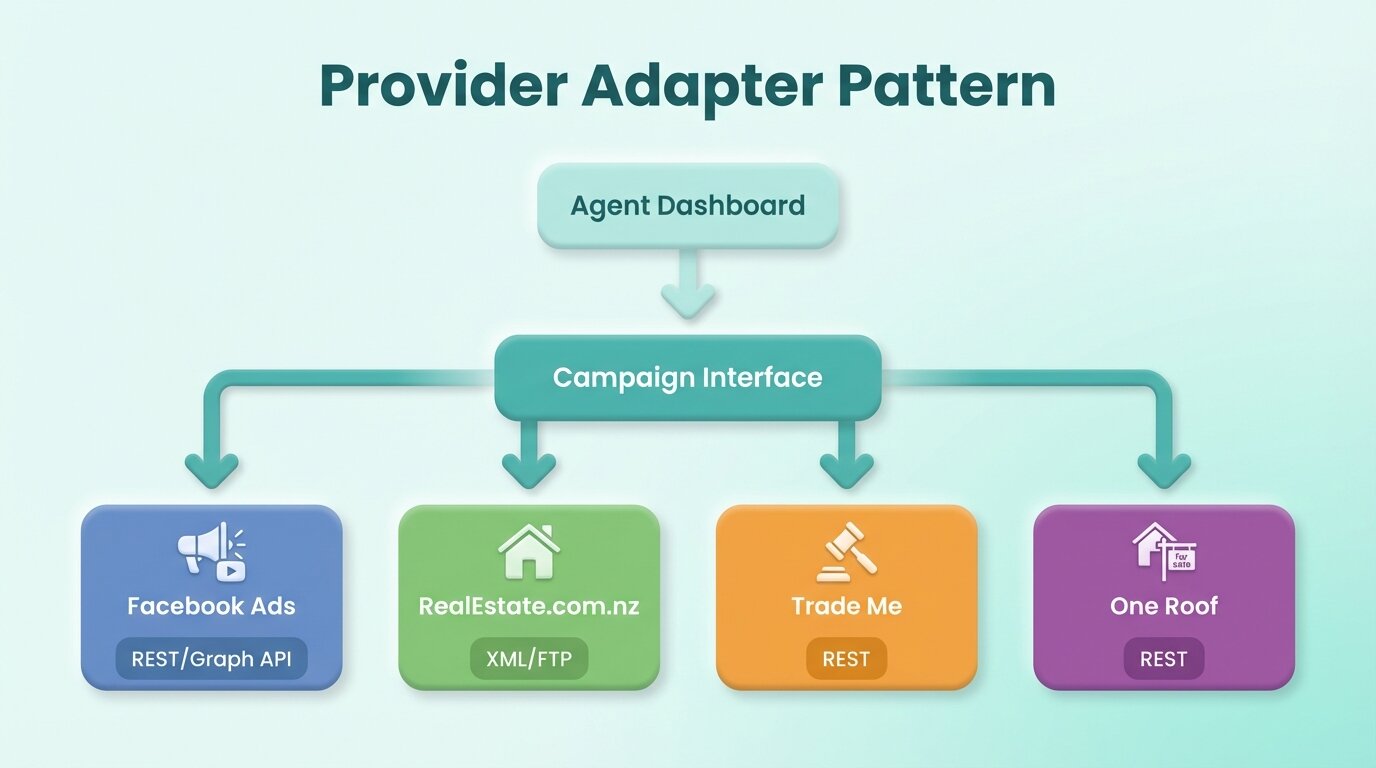
The four platforms differ in almost every dimension:
| Aspect | Facebook Ads | RealEstate.com.nz | Trade Me | One Roof |
|---|---|---|---|---|
| API Style | REST (Graph API) | XML/FTP | REST | REST |
| Auth | OAuth tokens | API keys | OAuth | API keys |
| Publishing | Async (review process) | Sync upload | Sync | Sync |
| Content | Ad creative + targeting | Structured listing | Auction listing | Property showcase |
| Status Model | Pending → Active → Paused | Published/Unpublished | Listed/Sold | Active/Inactive |
An agent creating a campaign shouldn’t need to understand these differences. They fill out a campaign form, select which platforms to publish on, and hit publish. The system handles the translation.
The Adapter Pattern in Practice
Every provider implements a common campaign interface. The interface defines the operations: create a campaign, update it, pause it, delete it, fetch statistics, and sync status. Each adapter translates between our internal domain model and the platform’s API.
The rest of the system — the campaign command handlers, the GraphQL resolvers, the dashboard — works exclusively with the common interface. It never touches provider-specific code. When we need to publish a campaign, we look up which providers are selected, get the corresponding adapters, and call the same method on each.
This means adding a fifth provider is a contained task: implement the interface, handle the platform’s quirks inside the adapter, and register it. No changes to the domain layer, the API, or the frontend.
Facebook Ads: The Complex One
Facebook’s integration is the most sophisticated. The Graph API supports multiple ad formats (carousel, single image, video), audience targeting with demographics and interests, budget management, and an asynchronous review process where ads can be rejected for policy violations.
The adapter handles creative assembly (combining property images, descriptions, and call-to-action buttons into the format Facebook expects), targeting configuration (translating our audience model into Facebook’s targeting spec), and status mapping (Facebook’s campaign statuses don’t map one-to-one to ours).
The async review process is particularly tricky. After publishing, a Facebook campaign enters a “pending review” state. The adapter needs to poll for the review result and update the campaign status in our system accordingly. This polling happens through the SQS worker, not in the API process.
Property Listing Portals: The Structured Ones
RealEstate.com.nz, Trade Me, and One Roof are property listing portals, not advertising platforms. They expect structured property data rather than ad creative.
RealEstate.com.nz uses an XML-based listing format uploaded via FTP — a workflow from a different era, but reliable. The adapter serializes our property model into the expected XML schema, handles image uploads separately, and manages the FTP connection.
Trade Me uses a REST API with New Zealand-specific property categories and an auction-style listing model. The adapter maps our property types to Trade Me’s category tree and handles the platform’s particular requirements around pricing display and auction rules.
Each portal has different image requirements — dimensions, file size limits, maximum count. The adapter handles resizing and formatting before upload.
Campaign State Machine
One of the hardest problems: each platform has its own concept of what “status” means, and these don’t align neatly.
Our internal campaign has a unified state machine: Draft → Publishing → Active → Paused → Completed → Failed. Each adapter maps between its platform’s states and ours. When we query campaign status, the adapter translates the provider’s response into our vocabulary.
Status synchronization runs periodically through the worker service. For each active campaign, the system queries each provider’s adapter for the current status and updates our records. Discrepancies (a campaign paused externally, a listing expired) trigger appropriate status transitions and user notifications.
Challenges
Error Handling Across Providers
Each platform fails differently. Facebook returns structured error codes. FTP uploads might silently fail. REST APIs might return HTML error pages instead of JSON. The adapter layer normalizes errors into a consistent format, but mapping every possible failure mode for four platforms is an ongoing effort.
Content Sanitization
Property descriptions written by agents contain all sorts of formatting: special characters, control characters, HTML fragments, excessive whitespace. Each platform has different tolerance for these. The adapter sanitizes content to match each platform’s requirements — what’s acceptable on Facebook might break the XML parser for RealEstate.com.nz.
Rate Limits
Each platform enforces different rate limits. Facebook’s Graph API has complex rate limiting based on app tier. Trade Me has straightforward per-minute limits. The adapters implement provider-specific rate limit handling, including backoff strategies and request queuing.
Testing
We can’t run integration tests against production APIs for every build. Facebook provides a sandbox environment. The listing portals don’t always have sandbox APIs. We use a combination of mocked adapters for unit tests and periodic manual integration tests against staging environments.
What I’d tell you before you start
The adapter pattern feels like over-engineering when you’re building the first integration. By the third, you’ll be glad you did it. The state machine mapping between provider statuses and your internal statuses is where most bugs hide — get that right early.
One rule we enforce strictly: provider quirks never leak into the domain layer. The moment you see platform-specific logic in a command handler, you’ve already lost the abstraction.
Half the ongoing work is debugging third-party API issues, especially the FTP-based ones. Detailed request/response logging per adapter is not optional. And expect every provider to change without warning — API versions deprecate, field names shift, auth flows evolve. Each adapter is a maintenance commitment.