Migrating from Clerk to Better Auth in a Production NestJS + Next.js App (Without Losing Users)
Why we moved away from Clerk, the parallel auth strategy that let us migrate without downtime, and what Better Auth offers for full-stack TypeScript apps.
Migrating auth in a production app is one of those things you put off until you can’t anymore. Auth touches every API call, every page load, every protected resource. If something breaks, users can’t log in. If something breaks quietly, users might see each other’s data.
But we’d hit the point where staying on Clerk was costing us more than leaving it.
Why we left Clerk
Clerk got us running fast. Auth was working in hours. But as Pengion Pilot grew, we kept hitting walls:
Pricing. Clerk charges per monthly active user. We’re a SaaS where agencies manage social media for dozens of clients, so auth cost was growing faster than revenue. We needed flat, predictable pricing.
White-labeling. Pengion Pilot supports tenants with custom domains. Clerk’s hosted auth pages can’t serve from a client’s domain. We needed to own the auth UI entirely.
Multi-tenancy. Our model goes Organization → Brand → Team → User. Clerk’s organization concept doesn’t fit that hierarchy. We were spending more time fighting the abstraction than using it.
Auditing every Clerk touchpoint
Before writing migration code, we went through the codebase and flagged every file that touched Clerk: auth guards, user ID columns, the user-tenant junction table, webhook handlers, Next.js middleware, OAuth token storage, frontend hooks. It showed up in more places than we expected.
Running both auth systems in parallel
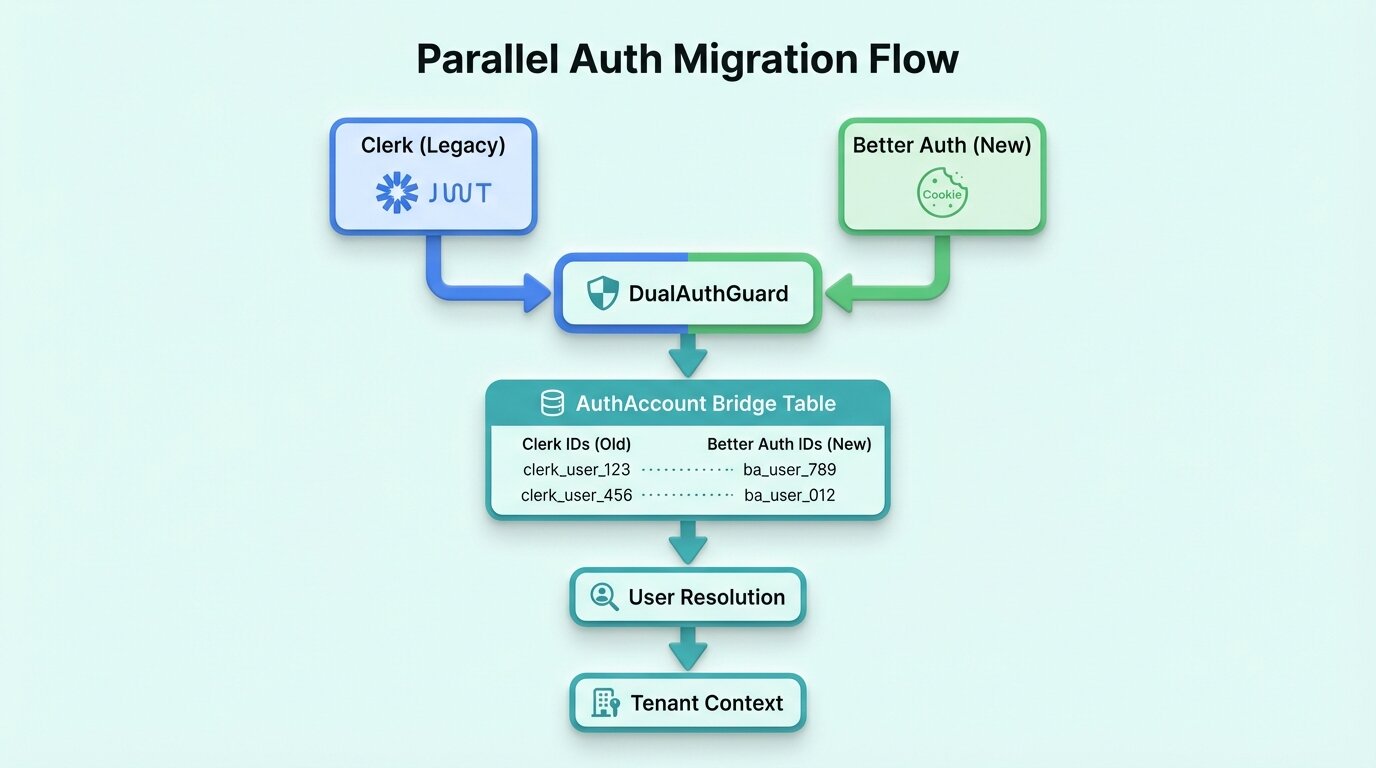
A clean cutover — rip out Clerk, drop in Better Auth, deploy — would have required everything to work on the first try. It would also mean forcing every user to reset their password that day. So we ran both systems side by side and migrated users without them noticing.
Step 1: Add Better Auth alongside Clerk
New signups went straight to Better Auth. We just stopped using Clerk for registration. For login, we removed the Clerk Next.js packages from the frontend and moved authentication to the backend using the Clerk JavaScript Backend SDK. A bridge table linked Clerk IDs to Better Auth IDs so the rest of the app could find a user in either system.
Step 2: Frictionless user migration on login
When someone logged in through Clerk, we captured their credentials from the successful auth and created a Better Auth account right there. Next login, they’d hit Better Auth directly. No password reset email, no “action required” banner. They never knew.
Step 3: Dual-token resolution
Not everyone logs in every week. Until they did, the NestJS auth guard and Next.js middleware both needed to accept tokens from either system, trying Better Auth first and falling back to Clerk. It’s throwaway code by design — you write it knowing you’ll delete it in a few weeks.
Step 4: Remove Clerk
We watched login metrics until most active users had silently migrated. The handful of dormant accounts got a password reset email. Once everyone was across, we pulled out the Clerk SDK, the fallback logic, the legacy ID columns, and the env vars.
Better Auth after 6 months
What we gained:
- Self-hosted, no per-user pricing. Auth cost is a flat hosting line item now.
- Full control over the login UI and redirect flows.
- Our tenancy model just works. No more shoehorning into Clerk’s org structure.
- Cookie-based sessions, which are simpler for our setup.
What we gave up:
- Clerk’s prebuilt UI components. We built our own login and signup pages.
- Clerk’s user management dashboard. We built an admin panel. It’s not as good.
If you need white-label multi-tenancy, Better Auth gives you the control. If your app is single-tenant and you want to ship this week, Clerk is still a good call.
Series: Building Pengion Pilot
This post is part of a series on the technical challenges we hit building Pengion Pilot. If you haven’t already, start with the first post covering the full architecture and tech stack.
- How We Built an AI SaaS from First Commit to Production
- Migrating from Clerk to Better Auth ← you are here
- Multi-Tenancy in NestJS
- AI Content Generation Pipeline
- Credit-Based Billing with Stripe
- Content Streams
- Full-Stack Type Safety
- SaaS Security Lessons
- Background Jobs and Workers
Each post covers actual decisions and bugs we hit. If you’re building a SaaS, hopefully some of this is useful.