How We Built an AI Social Media Automation SaaS from First Commit to Production
The architecture decisions, tech stack choices, and lessons from building Pengion Pilot, an AI-powered social media management platform with 1,200+ commits.
Building a SaaS from scratch forces you to make hundreds of decisions before you write your first line of business logic. Which framework? Monorepo or polyrepo? Managed auth or roll your own? Each choice compounds.
Pengion Pilot is an AI-powered social media management platform. Users connect their social accounts, describe their brand voice, and the AI generates platform-specific content that gets scheduled, approved, and published automatically. It handles Facebook, Instagram, LinkedIn, WordPress, Google Business, and X.
This is how we built it and what we’d change.
The problem we wanted to solve
Social media management tools fall into two camps: simple schedulers that don’t help with content creation, and enterprise platforms that cost thousands per month. We wanted something in between. A tool that could generate content using AI, manage it through approval workflows, and publish across platforms, aimed at small-to-medium businesses.
The core idea was content streams: automated pipelines that pull from RSS feeds, websites, uploaded documents, AI research, and Google Reviews, then turn it all into platform-specific social posts. More autopilot than scheduler.
The tech stack
Monorepo with Turborepo
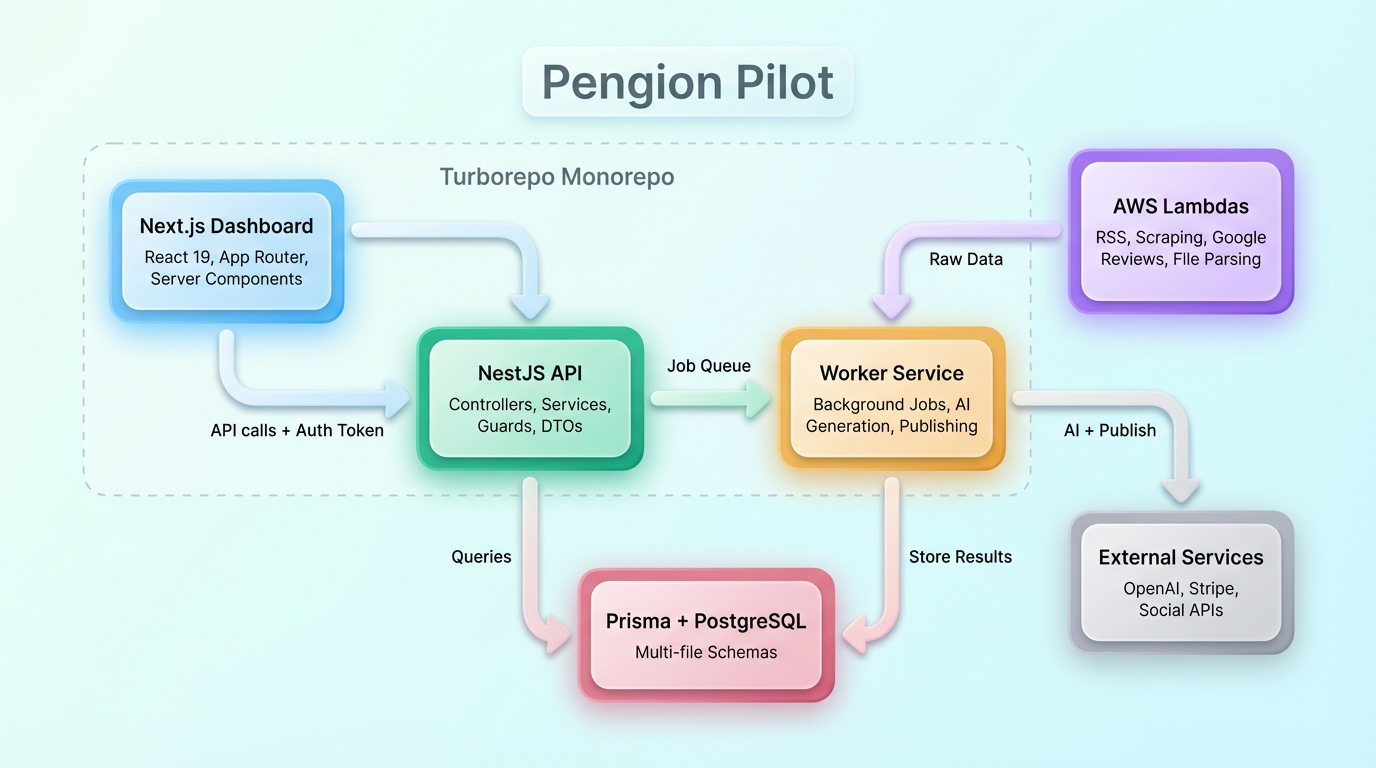
The codebase is organized as a Turborepo monorepo with multiple apps and a shared database package. The dashboard runs on Next.js with React 19 and server components. The API is built with NestJS. Background processing runs on a dedicated worker service. Serverless functions handle webhooks and async tasks.
The monorepo paid off almost immediately. Change a database model and TypeScript errors surface in the API and the dashboard in the same build. No more deploying with mismatched types between frontend and backend.
From server functions to a dedicated backend
The project started simple: Next.js server functions handling everything. As Pengion Pilot grew into a multi-tenant platform with more data sources, that approach hit its limits. We needed a dedicated API for authentication, tenancy resolution, and business logic. That’s where NestJS came in.
NestJS gave us what server functions couldn’t: structure. Controllers, services, DTOs, guards, decorators, modules. Its opinionated architecture meant everyone on the team knew where to put new code. When you have dozens of database models and API endpoints, that kind of structure keeps you from making a mess.
AWS Lambdas for content stream sources
The core API runs on NestJS, but we use AWS Lambda functions to pull data from content stream sources. Each source type (RSS feeds, website scraping, Google Reviews, file parsing) runs as its own Lambda. This keeps the main backend lean and lets each source scale independently. When a content stream triggers, the relevant Lambda fetches and processes the raw data, then hands it to the NestJS worker for AI generation and publishing.
Next.js with React 19
The dashboard uses the App Router with server components. All data flows through the NestJS API; the dashboard never touches the database directly. Server components call the API for the calendar view, analytics, and content stream configuration. Client components manage interactive pieces like the post editor, drag-and-drop scheduling, and the image studio.
The one exception is server actions, which fetch white-label branding, tenant details, billing status, and account status. These need to resolve early in the rendering pipeline, before any API call, so the dashboard can apply the correct theme, logo, and domain-specific configuration on the initial load, and gate features based on the current plan.
Prisma with multi-file schemas
Prisma’s multi-file schema support was a big deal at our scale. Each domain (posts, brands, content streams, billing, integrations) lives in its own schema file. Keeps things navigable and reduces merge conflicts when multiple developers touch the schema at the same time.
Core features
Content streams
The main feature. A content stream is an automated pipeline:
Source > Process > Generate > Schedule > Approve > Publish
We support seven content source types:
| Source | How it works |
|---|---|
| RSS Feeds | Monitor feeds, extract articles, generate posts |
| Websites | Scrape pages, extract content |
| Uploaded Files | Parse PDFs, extract text, generate posts |
| AI Deep Research | AI researches topics in depth |
| AI Topics | Generate content from topic descriptions |
| API/Zapier | External triggers via API |
| Google Reviews | Fetch reviews, generate promotional content |
Brand voice management
Every brand has a voice profile: writing style, tone, personality traits, audience demographics. The AI uses this to generate content that sounds like the brand, not like a bot. Getting the prompt engineering right here was tricky. You want the AI to respect constraints without every post sounding the same.
Multi-platform publishing
Each platform has its own quirks. Instagram requires images. LinkedIn has different character limits than Facebook. X needs brevity. The generation pipeline produces platform-specific variants of the same core content, respecting each platform’s constraints.
Credit-based billing
AI operations have variable costs, so we built a credit system on top of Stripe subscriptions. Different plans get different credit allowances, and each operation has a defined credit cost. This lets us price proportionally to usage while keeping the UX simple.
The architecture pattern
The request flow looks like this:
- Dashboard makes API calls with auth token
- NestJS controller validates input via DTOs
- Auth guard resolves the current user’s tenant context
- Service layer handles business logic with Prisma
- For content stream ingestion, AWS Lambdas fetch data from external sources
- For async operations, jobs are queued to the worker
- Worker processes jobs (content generation, publishing) on a separate process
This separation (API for HTTP, Lambdas for data ingestion, worker for background jobs) was the most important architectural call we made. Early on, everything ran in the API process, which caused request timeouts and tightly coupled the data-fetching logic to the core backend. Splitting it up solved both problems.
What we’d do differently
We started with Clerk for auth, then had to migrate to Better Auth mid-project when we needed white-label support. That cost us weeks of dual-auth compatibility code, user migration scripts, and edge case bugs. Should have picked the right auth from the start.
Our tenancy model (Organization, Brand, Team, User) evolved organically, which meant three rounds of major refactoring. If we’d designed this upfront, we would have saved a lot of time.
We added background job tracking and AI call logging late. Having observability from the start would have caught several production issues sooner.
Series: Building Pengion Pilot
This is the first post in a series on the technical challenges we hit building Pengion Pilot.
- How We Built an AI SaaS from First Commit to Production ← you are here
- Migrating from Clerk to Better Auth
- Multi-Tenancy in NestJS
- AI Content Generation Pipeline
- Credit-Based Billing with Stripe
- Content Streams
- Full-Stack Type Safety
- SaaS Security Lessons
- Background Jobs and Workers
Each post covers actual decisions and bugs we hit, not theoretical best practices. If you’re building a SaaS, hopefully they save you some pain.