Implementing Multi-Tenancy in NestJS: Organizations, Brands, Teams, and White-Labels
How we built a 4-layer tenancy model for a SaaS product, the database design patterns that made it work, and why multi-tenancy is never a one-shot implementation.
Multi-tenancy is one of those problems that seems simple until you build it. “Just scope everything by organization ID” — that’s the advice you’ll find in most tutorials. In practice, a real SaaS needs layers of tenancy, and each layer adds cascading complexity.
Pengion Pilot’s tenancy model has four layers. Here’s how we designed it, what broke along the way, and the patterns we wish we’d known from the start.
The Tenancy Model
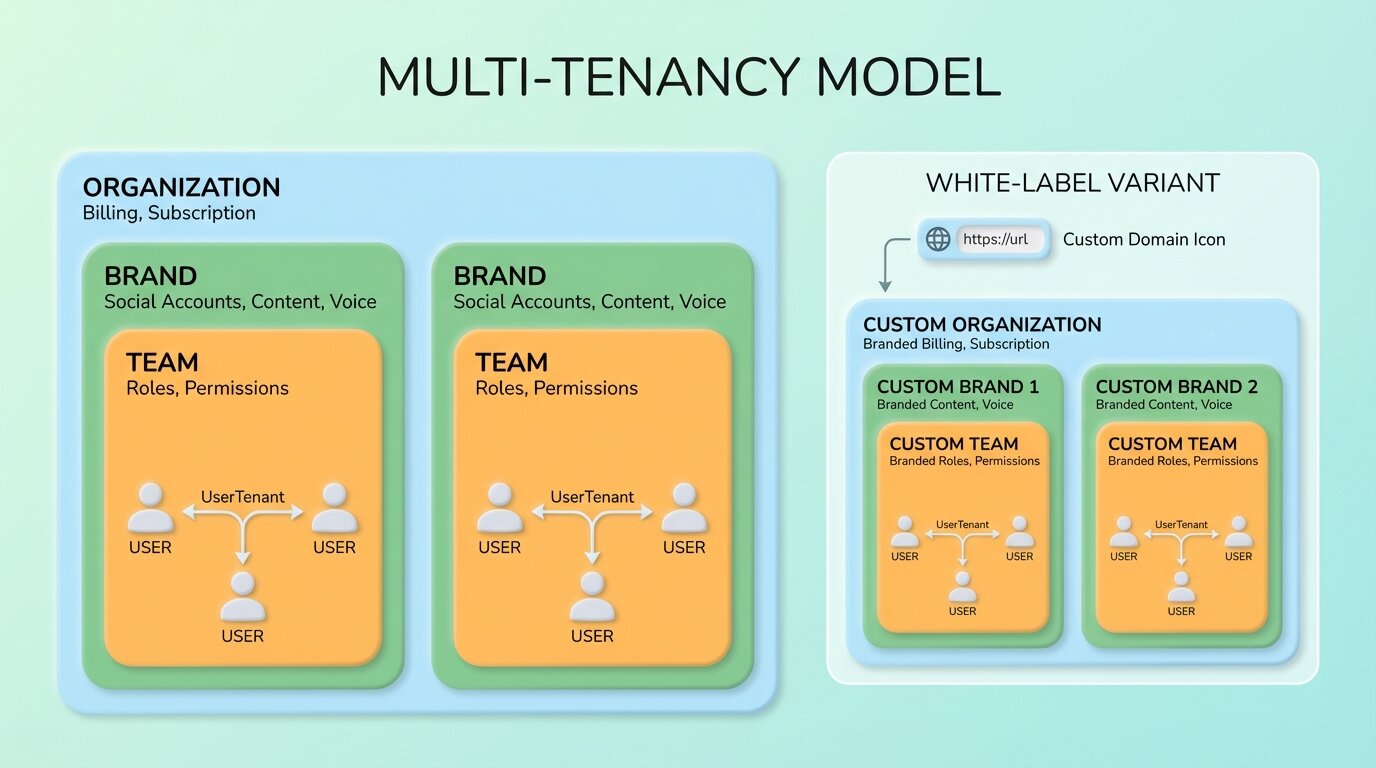
Our model has four levels, each with a distinct role:
Organization — The billing entity. Owns the subscription, payment method, and credit balance. An agency or company.
Brand — Each organization can have multiple brands. A digital marketing agency might manage social media for 10 different clients — each is a brand with its own social accounts, content library, voice profile, and posting schedule.
Team — Users within a brand. A brand might have a content creator, an approver, and a client viewer — each with different permissions.
UserTenant — The junction table linking a user to a tenant (organization) with a specific role. This is the central identity — almost every model in the system references it.
Why Four Layers?
A simpler model (just Organization → User) would mean every user sees everything in the organization. That doesn’t work when:
- An agency manages 10 client brands, and each client should only see their own brand
- A content creator for Brand A shouldn’t access Brand B’s unpublished posts
- Billing is per-organization, but permissions are per-brand
The four-layer model lets us scope data access precisely: billing at the org level, content at the brand level, permissions at the team level.
Database Design
Brand-Scoped Queries
Nearly every data query in the system is scoped to a brand. Posts, content streams, integrations, scheduled items — all belong to a brand. Every query starts with the brand filter. Missing it means a data leak — users seeing posts from other brands. This pattern repeats across every service in the codebase.
The Foreign Key Lesson
Early on, we used cascade deletes on foreign keys. When an organization was deleted, it cascaded through brands, teams, posts, content streams — wiping everything. This is correct behavior, but it caused a production incident when an admin accidentally deleted an organization during testing.
We changed critical foreign keys to restrict deletes, which forces explicit cleanup. Deleting an organization now requires programmatically removing its dependent data first. Slower, but much safer.
Schema Organization
With 20+ Prisma schema files organized by domain, keeping the schema navigable was important. Each domain — users, tenants, brands, posts, content streams, billing, integrations — lives in its own file. This reduces merge conflicts and makes it easy to find the model you’re looking for.
Request-Scoped Tenant Resolution
Every API request needs to know which tenant and brand the user is acting within. We built a custom decorator that resolves this from the auth token, loading the user’s tenant membership and associated brands.
The Performance Problem
This resolution runs on every request. With eager loading for tenant and brand relations, it’s a multi-join query hitting the database on every API call.
We hit a performance wall at scale. The fix was request-scoped caching: resolve the tenant once per request, cache it on the request object, and return the cached version for subsequent invocations within the same request. Simple, but it cut database queries by roughly 40% on endpoints that referenced the tenant multiple times.
The Permission System
Permissions operate at two levels:
Account roles — what you can do within the organization (admin, member)
Brand roles — what you can do within a specific brand (owner, editor, viewer, client)
Guards on each endpoint enforce the required role before allowing access. Only brand owners and editors can create posts. Only admins can manage billing. Viewers can see content but not modify it.
The approval workflow adds another dimension. Posts can require team approval, client approval, or no approval:
- Team approval: any team member with a sufficient role can approve
- Client approval: generates an external link that clients can use to review and approve posts without logging in
- No approval: posts go directly to scheduled status
White-Label Complications
White-label tenants get their own custom domain, branding, and isolated experience. This adds complexity at every layer:
Custom domain routing. The dashboard detects which tenant the user is accessing based on the hostname. Middleware resolves the tenant from the domain before any auth or data fetching happens.
OAuth redirect URLs. Social media OAuth flows redirect to a specific URL after authorization. For white-label tenants, these redirects need to go to the tenant’s custom domain, not the default domain. Each social platform needs the custom domain registered as an authorized redirect URL.
Registration restrictions. The default tenant allows open registration. White-label tenants restrict registration to invited users only.
The Iterative Reality
Our git history tells the real story. We refactored the tenancy model three times:
- v1: Simple organization-based scoping. Worked until we needed brands.
- v2: Added brands as sub-entities. Broke when we needed per-brand permissions distinct from org permissions.
- v3: The four-layer model with UserTenant as the central identity. Stable, but required migrating all existing data.
Each refactoring touched 30+ files. The lesson: multi-tenancy isn’t something you add incrementally. Design the full model upfront, even if you only implement parts of it initially. Having the schema ready prevents the painful migrations.
What survived three refactors
Scope data by brand, bill by organization. These are different concerns and mixing them creates problems later.
Cache tenant resolution per-request. The decorator pattern is clean but expensive if you’re hitting the database every time a resolver needs the tenant context. Request-scoped caching cut our query count by 40%.
Use restricted deletes on critical foreign keys. We learned this the hard way when a cascade wipe took out an entire organization’s data during testing.
Every endpoint resolves the tenant from the auth token. No exceptions. A missing check is a data leak.
And the one I wish someone had told us earlier: design the full tenancy model before building. We iterated on ours three times. Each refactor touched 30+ files. If we’d modeled all four layers from the start — even implementing them incrementally — we’d have saved weeks.
Series: Building Pengion Pilot
This post is part of a series on the technical challenges we hit building Pengion Pilot. If you haven’t already, start with the first post covering the full architecture and tech stack.
- How We Built an AI SaaS from First Commit to Production
- Migrating from Clerk to Better Auth
- Multi-Tenancy in NestJS ← you are here
- AI Content Generation Pipeline
- Credit-Based Billing with Stripe
- Content Streams
- Full-Stack Type Safety
- SaaS Security Lessons
- Background Jobs and Workers
Each post covers actual decisions and bugs we hit. If you’re building a SaaS, hopefully some of this is useful.