Building an AI Content Generation Pipeline for Social Media with OpenAI and Gemini
How we built a production AI pipeline that generates brand-consistent social media content across platforms, handles image generation, and manages dual AI providers.
“Just call the OpenAI API and post the result.” That’s what building AI-powered content generation sounds like from the outside. In practice, generating social media content that’s actually usable — brand-consistent, platform-specific, visually accompanied, and reliably produced at scale — takes a lot more work than that.
The Architecture
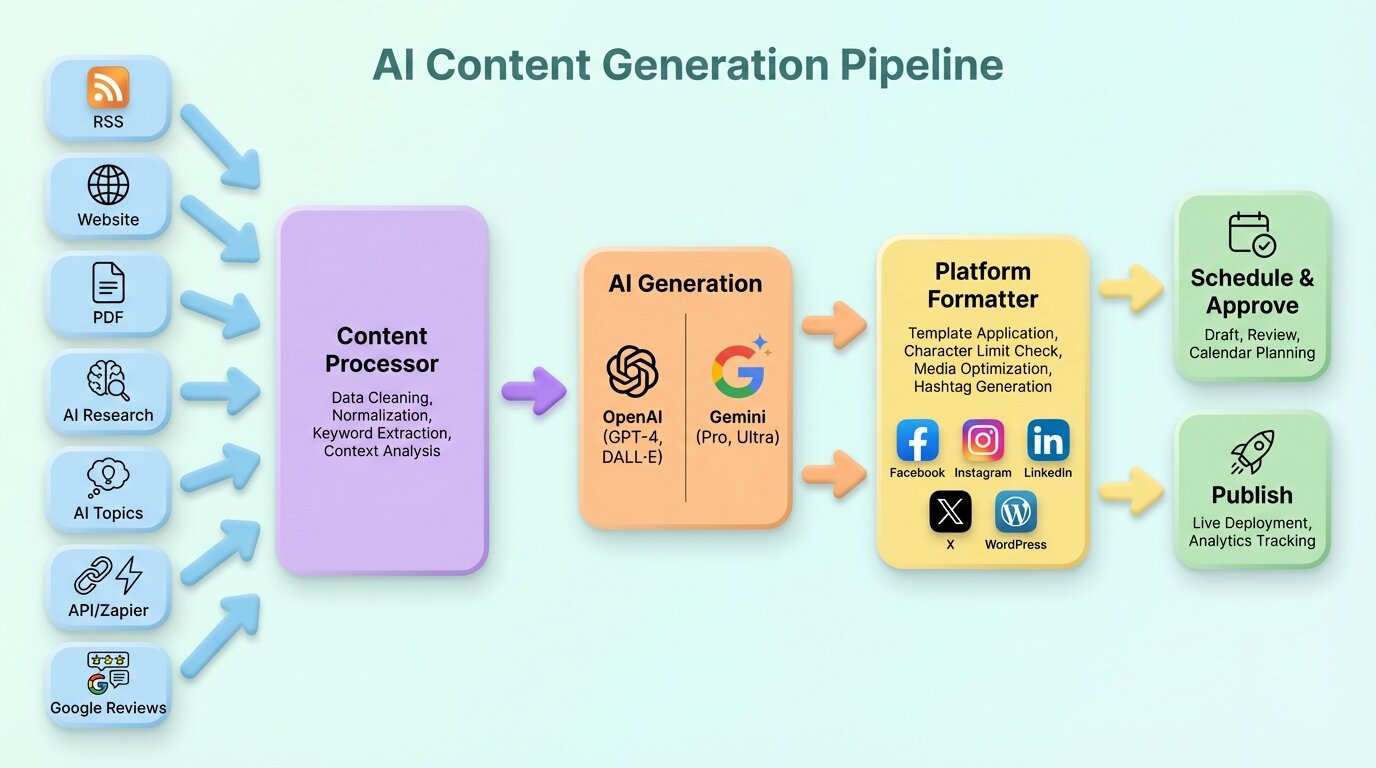
The AI system lives in a dedicated module within the API, organized by provider, prompt templates, orchestration services, and shared interfaces.
The key design decision: provider abstraction. Both OpenAI and Gemini implement the same interface, so the rest of the system doesn’t care which model generates the content. A factory resolves the correct provider based on the operation type. Text generation defaults to OpenAI (better at following brand voice instructions). Image analysis uses Gemini (better at understanding visual content). Users can override the default in their brand settings.
The Content Source Pipeline
Content doesn’t appear from nothing. Every generated post starts with source material — and we support seven different source types:
RSS Feeds
The simplest source. We poll feeds, extract article content, and feed it to the AI with instructions to summarize and adapt for social media. An optional repost mode skips AI transformation entirely — the content is posted as-is without rewriting. Useful for brands that just want to share articles with their audience.
Websites
More complex. We crawl configured websites and extract clean article content from each page. A tracking model records which pages have been processed to avoid duplicate generation. A unique constraint on stream ID and URL prevents re-processing the same page.
Uploaded Files
PDFs uploaded by users are parsed to extract text. This is useful for generating social content from whitepapers, reports, or product documentation.
AI Deep Research
The most interesting source. Users describe a topic, and the AI conducts multi-step research: generating search queries, synthesizing findings, and producing a research brief. That brief then feeds the content generation pipeline. These jobs can take several minutes, so they run asynchronously with background job tracking.
Google Reviews
We fetch business reviews via the Google Places API and generate promotional content. A 5-star review becomes a social post highlighting the customer’s experience, with the review text woven naturally into the post.
Making AI Respect Your Brand Voice
This is where prompt engineering gets interesting. Every brand in Pengion Pilot has a voice profile covering writing style, tone, personality traits, audience demographics, and specific content instructions.
The system assembles these into a detailed context prompt that instructs the AI to write as the brand, not as a generic AI assistant. We learned that explicit negative instructions (“don’t do X”) are often more effective than positive ones (“do Y”). Telling the AI what to avoid — generic phrases, emoji overuse, corporate buzzwords — produces noticeably more natural output than describing what “natural” means.
Platform-Specific Generation
A single piece of source content produces different posts for each platform:
| Platform | Key Constraints |
|---|---|
| Image required, character limit, hashtags important | |
| Professional tone, longer format, no hashtags in body | |
| Casual tone allowed, link previews | |
| X | Short and concise, hashtags sparingly |
| WordPress | Full article format, SEO metadata |
Each platform gets its own set of formatting instructions in the prompt. An Instagram caption and a LinkedIn thought piece are fundamentally different content types, even when they’re derived from the same source material.
The Image Generation Pipeline
Text posts get lower engagement. Every content stream can configure image generation alongside text.
Image Studio Templates
Pengion Pilot includes an Image Studio where users create templates with variables — title, subtitle, background image, brand colors. When content is generated, the AI fills in the template variables to produce on-brand images. Each platform gets the appropriate aspect ratio automatically (square for Instagram, landscape for LinkedIn and Facebook).
The Base64 Lesson
Early on, we stored generated images as base64 strings in the database. This was fast to implement but caused database bloat and slow queries. We migrated to object storage with a repair mechanism that detected existing inline images and moved them to proper storage. Lesson: use object storage from day one.
Handling Failures
AI generation fails. APIs time out. Rate limits hit. Content gets flagged. Our failure handling evolved through painful production incidents.
Race Condition Prevention
The biggest bug: duplicate post generation. When the cron job fires content generation for a content stream, it checks for pending schedules. If the generation takes longer than the cron interval, the next cron run sees the same pending schedules and generates duplicates.
The fix: pre-reserve schedule slots before starting generation. An atomic status transition marks schedules as “in progress” before any generation begins. Even if the cron fires again, those slots are already claimed.
Credit Refunds
When generation fails, the user shouldn’t lose credits. We deduct credits optimistically before generation and refund on failure. This prevents users from queuing more generations than their balance allows while ensuring failures don’t cost them.
Max Retry Attempts
Failed generations get a limited number of retry attempts. After that, the post is marked as permanently failed and the user is notified. Tracking attempt counts prevents infinite retry loops.
OpenAI vs Gemini: When to Use Which
After months of production use with both providers:
- Text generation: OpenAI follows brand voice instructions more precisely. Gemini tends to be more creative but less controllable.
- Image understanding: Gemini excels at analyzing images from URLs — understanding what’s in a screenshot, extracting text from images.
- Cost efficiency: Gemini is cheaper for high-volume operations where precision is less critical.
- Speed: Gemini is faster for simple generation tasks. OpenAI is more consistent but slower.
The dual-provider strategy also gives us resilience. When one provider has an outage, we can fall back to the other with adjusted prompt tuning.
What we’d do differently (and what we’d keep)
Negative prompts beat positive ones for brand voice. “Don’t sound like a corporate press release” produces better output than “write naturally.” We spent weeks tuning positive instructions before discovering that telling the AI what to avoid works faster.
Platform-specific generation is non-negotiable. A LinkedIn post and an Instagram caption are different content types — treating them as the same produces mediocre results on both.
Pre-reserve schedule slots before generation starts. We had a duplicate post bug that took two weeks to track down, and the fix was a single atomic status transition.
Store images in object storage from day one. We started with base64 in the database and had to build a migration tool to fix it. And make credit refunds automatic — if generation fails, credits go back instantly. Nobody should have to file a support ticket for a failed API call.
Series: Building Pengion Pilot
This post is part of a series on the technical challenges we hit building Pengion Pilot. If you haven’t already, start with the first post covering the full architecture and tech stack.
- How We Built an AI SaaS from First Commit to Production
- Migrating from Clerk to Better Auth
- Multi-Tenancy in NestJS
- AI Content Generation Pipeline ← you are here
- Credit-Based Billing with Stripe
- Content Streams
- Full-Stack Type Safety
- SaaS Security Lessons
- Background Jobs and Workers
Each post covers actual decisions and bugs we hit. If you’re building a SaaS, hopefully some of this is useful.