Content Streams: How We Automated Social Media Publishing from 7 Different Sources
How we built a 'set it and forget it' content pipeline that turns RSS feeds, websites, PDFs, AI research, and Google Reviews into scheduled social media posts.
Most social media tools are glorified schedulers. You write the post, pick a time, hit schedule. Pengion Pilot’s content streams flip that model: you define the source, the rules, and the schedule — then the system continuously generates, schedules, and publishes content without you touching it.
Building a “set it and forget it” system that actually works — reliably, across seven different content sources, with approval workflows and platform-specific formatting — was one of the most complex features we built.
What Is a Content Stream?
A content stream is an automated pipeline with six stages:
Source → Process → Generate → Schedule → Approve → Publish
Each stream has its own configuration:
- Content source: where raw material comes from (RSS, website, PDF, etc.)
- Schedule: when and how often to generate posts (daily, weekly, custom)
- Platforms: which social networks to publish to
- Brand voice: which brand profile to use for generation
- Approval rules: whether posts need team or client approval before publishing
A digital marketing agency might have 20 content streams running simultaneously across 5 brands — each sourcing from different feeds, generating for different platforms, on different schedules.
The Seven Source Types
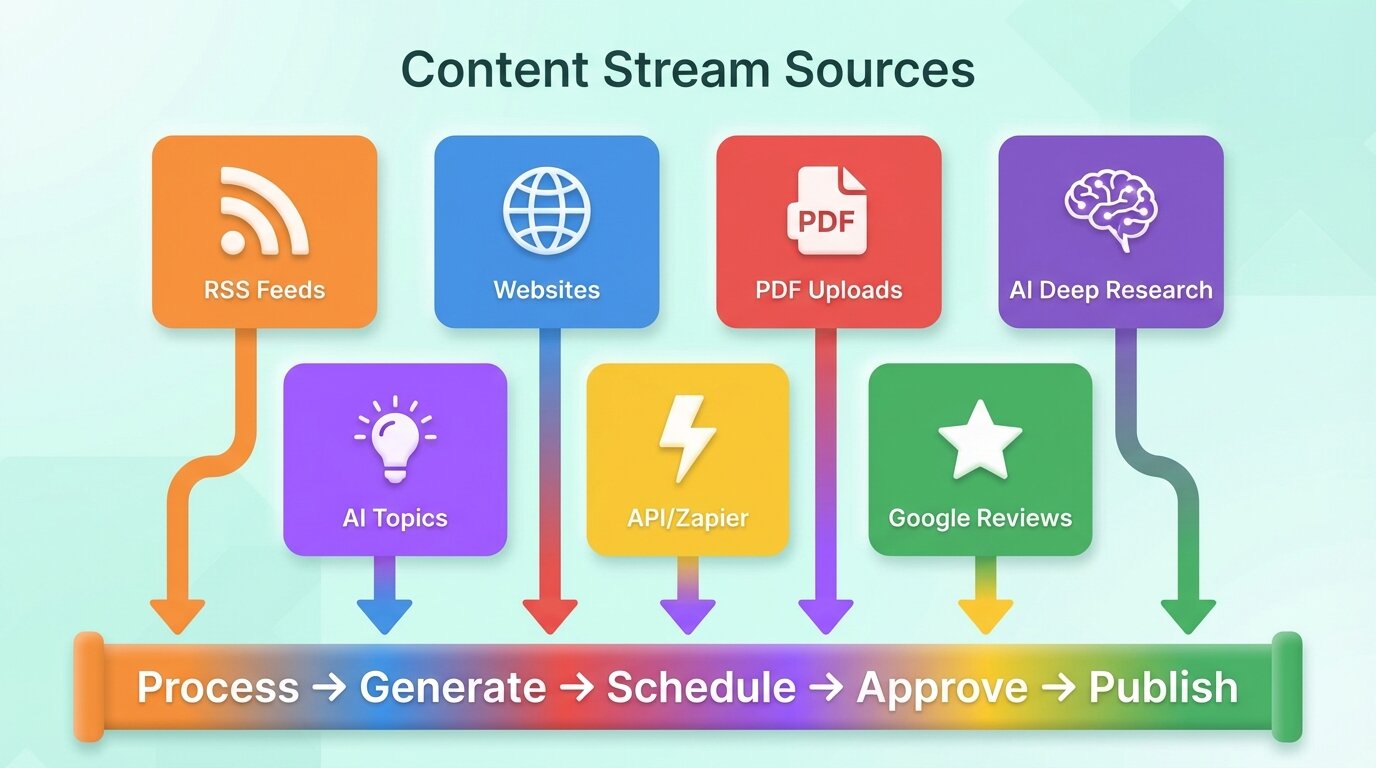
1. RSS Feeds
The most straightforward source. We monitor RSS feeds, detect new items, and generate social posts from article content. An optional repost mode skips AI transformation entirely — it posts the article title and link as-is. Useful for news aggregation brands.
2. Websites
Deeper than RSS. We crawl configured websites and extract clean article content from each page. Processed URLs are tracked to prevent re-scraping the same page for the same stream.
3. Uploaded Files
Users upload PDFs (product brochures, whitepapers, case studies) and the system extracts text, then generates a series of social posts from the content. Useful for turning long-form content into a week of social posts.
4. AI Deep Research
The heaviest source type. Users describe a topic, and the AI generates research queries, searches and synthesizes findings, produces a research brief, and then generates multiple social posts from it. These jobs run asynchronously with progress tracking in the dashboard.
5. AI Topics
A simpler version of deep research. Users provide a topic or prompt, and the AI generates content directly without the research step. Good for opinion posts, tips, and thought leadership content.
6. API / Zapier
External systems trigger content generation via API. A Zapier workflow might listen for new blog posts on a WordPress site and send the content to Pengion Pilot for social distribution. The API accepts templates with variables for flexible content creation.
7. Google Reviews
For local businesses, we fetch reviews via the Google Places API and generate promotional content. The AI adapts the review sentiment while respecting Google’s terms of service around verbatim quoting.
The Scheduling Engine
Each content stream has a schedule — when to generate new posts and when to publish them.
Schedule Patterns
- Daily: generate a post every day at a specified time
- Weekly: generate posts on specific days of the week
- Custom: user-defined intervals with start/end dates
Timezone handling was trickier than expected. “Post every day at 9am” means 9am in the brand’s timezone, not UTC. We store the IANA timezone string on each brand and use a proper timezone library for all schedule calculations.
The Race Condition That Almost Broke Everything
Our generation cron job runs periodically, checking for content streams with pending schedules. The generation process for a single post can take 30-60 seconds (AI generation + image creation). If the cron fires again while generation is still running, it finds the same pending schedules and starts generating duplicates.
The fix: pre-reserve schedule slots. An atomic database operation claims pending schedules by transitioning their status before generation begins. Even if two cron invocations overlap, only one can claim each schedule slot.
Approval Workflows
Not all generated content should go live immediately. Content streams support three approval modes:
No Approval Required
Posts go directly from generated to scheduled. Useful for content streams with highly reliable sources.
Team Approval
Generated posts enter a review queue. Team members with sufficient roles can approve, edit, or reject posts. The dashboard shows a filterable approval queue with bulk actions.
Client Approval
For agencies managing client brands, posts can be sent to clients for approval via external links. A unique, expiring URL lets clients review posts without needing an account. They can approve, reject with notes, or request changes.
Quick Setup Wizard
The complexity of content stream configuration could overwhelm users. We built a guided wizard that breaks setup into steps:
- Choose source type and configure it (paste RSS URL, upload PDF, etc.)
- Select platforms and customize per-platform settings
- Set schedule with visual calendar preview
- Configure approval workflow
- Review and activate
AI-assisted topic suggestions help users who aren’t sure what to post about. Based on their brand profile and industry, the AI suggests content themes and angles.
Monitoring Automated Content
When you have 20 content streams running autonomously, visibility into what’s happening is critical.
The dashboard shows:
- Stream status: active, paused, erroring
- Pending posts: posts awaiting approval
- Generation queue: what’s currently being generated
- Failure log: posts that failed generation with error details
- Publishing stats: posts published per stream per platform
Streams that fail repeatedly are automatically paused with a notification to the user. This prevents burning credits on a broken source.
What we learned running 20+ streams in production
Use atomic state transitions to claim work items before processing. Without this, overlapping cron runs generate duplicate posts — the bug that nearly broke our beta launch.
Timezone-aware scheduling is its own sub-system. We tried bolting it on as an afterthought and ended up rewriting the entire scheduling engine. Design for it from the start.
Approval workflows change the data model more than you’d expect. A post isn’t “draft → published” — it’s a state machine with branches for team approval, client approval, rejection, re-generation, and expiration. We underestimated this by a factor of three.
Source reliability varies wildly. RSS feeds just work. Website scraping breaks every time a site redesigns. We added auto-pause for streams that fail repeatedly, which saved us from burning through credits on broken sources.
The setup wizard turned out to be as important as the feature itself. Content streams are powerful but complex to configure — without a guided setup flow, nobody used them.
Series: Building Pengion Pilot
This post is part of a series on the technical challenges we hit building Pengion Pilot. If you haven’t already, start with the first post covering the full architecture and tech stack.
- How We Built an AI SaaS from First Commit to Production
- Migrating from Clerk to Better Auth
- Multi-Tenancy in NestJS
- AI Content Generation Pipeline
- Credit-Based Billing with Stripe
- Content Streams ← you are here
- Full-Stack Type Safety
- SaaS Security Lessons
- Background Jobs and Workers
Each post covers actual decisions and bugs we hit. If you’re building a SaaS, hopefully some of this is useful.